
For years, the honest answer to “does Microsoft back up my Entra ID?” was no. Since June, the answer is “sort of,” and that “sort of” is worth a few minutes of your time.
If you only have 60 seconds:
- Microsoft’s native Entra Backup and Recovery went generally available in June 2026. It backs up daily and keeps up to seven days.
- It covers the core directory objects, including Conditional Access policies. It does not recover hard-deleted objects, Active Directory-managed objects, or anything outside its supported list.
- Seven days is a short runway. Slow-burn changes, wide-scale admin compromise, and Intune policies are where a separate, longer-lived backup earns its keep.
- The question I’d ask this week: could anyone rebuild your Conditional Access policies from scratch, and restore everything in the proper order?
What changed in Entra ID backup
I wrote about Entra ID backup in Part 2 of my Veeam ON Tour Toronto recap, and the short version was this: Entra ID objects such as app registrations, Conditional Access policies, and Intune policies are cloud-native, and they don’t come back from an Active Directory backup. That’s still true. What’s different is that Microsoft now has its own answer for part of that problem.
Microsoft Entra Backup and Recovery launched in public preview in March 2026 and went generally available in June. The basics, per Microsoft’s documentation:
- Backups happen automatically, once a day.
- Backups are kept for up to seven days.
- It covers users, groups, applications, service principals, Conditional Access policies, named locations, and the authentication method and authorization policies (selected properties).
- It requires Entra ID P1 or P2 licensing, and it only works with workforce tenants.
- You can run a difference report to see what changed, then run a recovery job to roll specific objects back.
That’s real progress, and it deserves credit. A Conditional Access policy that got edited in place used to mean rebuilding from memory, screenshots, or a PowerShell export somebody hopefully made. Now there’s a built-in way back.
Soft delete still sits alongside it. Deleted users, Microsoft 365 Groups, cloud security groups, application registrations, service principals, administrative units, Conditional Access policies, and named locations can be restored for 30 days. Everything else is hard-deleted immediately, and a hard-deleted object can’t be recovered.
What it doesn’t cover
I’d treat native backup as a good floor, not a ceiling. Here’s where I’d recommend reading the fine print.
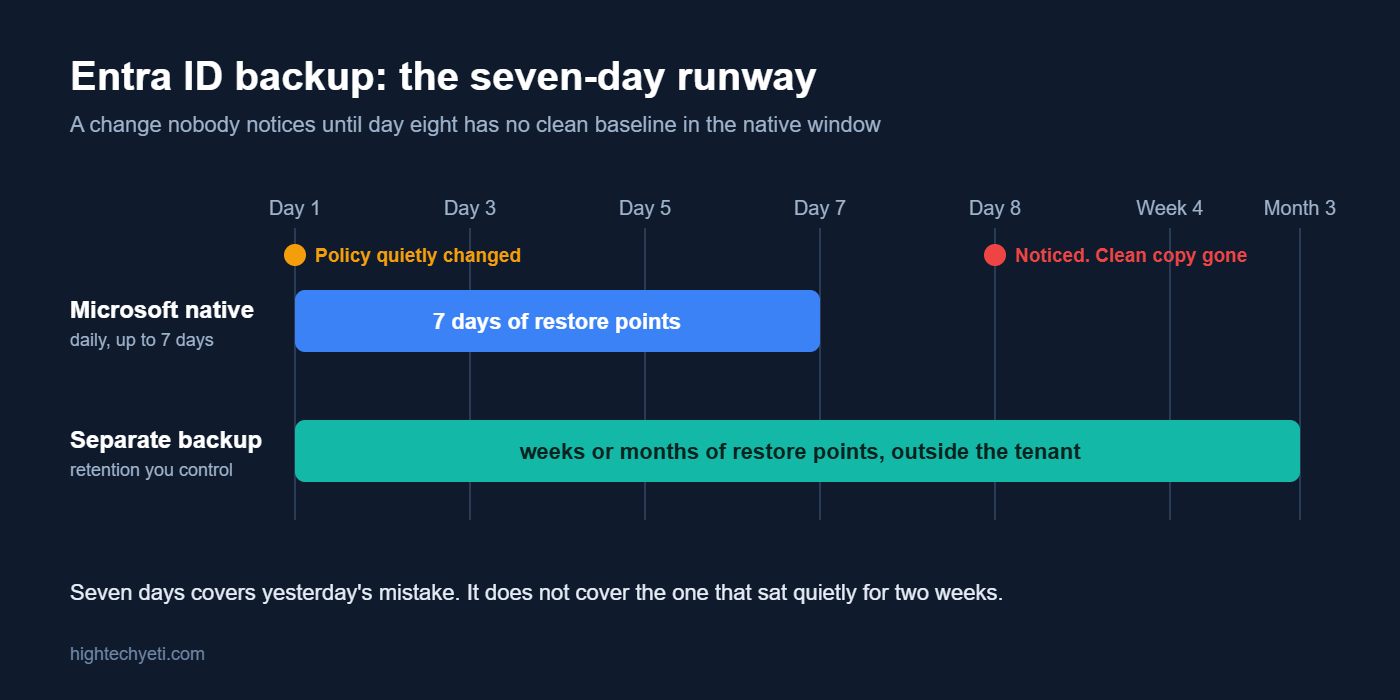
It’s not a long window. Seven days is plenty for “someone fat-fingered a policy yesterday.” It’s not much for a change that slips by unnoticed for a couple of weeks, and anyone who has worked an incident knows how long a quiet change can sit there before someone spots it. If nobody notices until day eight, you have no clean baseline to restore from.
Hard-deleted objects stay gone. Microsoft says plainly that Backup and Recovery doesn’t support recovering or re-creating hard-deleted objects.
Hybrid objects are a different story. For objects synced from on-premises Active Directory, you can create difference reports, but you can only recover objects whose source of authority has moved to the cloud. Microsoft’s own page says to use an alternative solution for objects managed in AD DS.
It covers a defined list of objects and properties. Microsoft expands coverage over time, but Intune policies aren’t on the supported object list today. That matters more than it sounds. Intune is how many organizations push device configuration, compliance rules, and (in the worst case) wipe commands. In March 2026, Stryker reportedly saw compromised administrator access used to abuse Intune and wipe devices (CISA alert and HIPAA Journal). I’d want a recovery plan for exactly that kind of event, and an in-tenant, seven-day backup is only part of it.
The backup lives inside the thing it protects. Microsoft says no signed-in user or application, even with the highest admin privileges, can turn off, delete, or modify these backups, so my concern is dependence, not tampering: if the tenant itself is the problem, the backup shares its fate (and its seven-day limit). I’d want a copy that sits outside the tenant. Microsoft does recommend using Backup and Recovery “as part of a broader approach to recoverability,” which I read as a polite way of saying the same thing.
Where a separate backup earns its keep
This is where I’ll be upfront: Long View is a Veeam partner, so I’m not neutral, and I haven’t tested Veeam’s Entra ID protection myself, yet. At Veeam ON Tour Toronto, the session on Microsoft 365 and Entra ID argued that identity is the front door to your environment, and that protecting Microsoft 365 without protecting Entra ID leaves that door open. I agree with the framing. Veeam’s slide listed users, groups, administrative units, roles, app registrations, enterprise applications, Conditional Access, Intune policies, and (new) devices with BitLocker keys, plus exportable audit and sign-in logs.
Take that as a vendor’s claim, and compare it against Microsoft’s list above. Where the two differ is where I’d focus my testing, not where I’d take anyone’s word. The practical differences I’d look at:
- Retention you control. Weeks or months of restore points, instead of seven days.
- Coverage beyond the core directory. Intune policies, roles, administrative units, and device-related data.
- A copy outside the tenant. If the tenant itself is the problem, you want a recovery path that doesn’t depend on it.
- Compare and restore at the property level. Derran Guinan described comparing today’s Entra state to yesterday’s, seeing exactly what changed, and restoring only those objects instead of everything. Microsoft’s difference reports do something similar inside the tenant, so this is worth putting side by side in a lab.
- Logs you can export. Veeam’s slide listed exportable audit and sign-in logs, which matter when someone asks “who changed this, and when?” after the fact.
Beyond disaster recovery
Veeam’s own material makes the case that these backups aren’t only for the worst day. Treat these as vendor claims:
- Audit and compliance. A record of when policies changed helps you answer who changed what, and when.
- Tenant migrations. Conditional Access policies are complex, and rebuilding them by hand in a new tenant invites mistakes. A good backup doubles as documentation of what you had.
- Human error. One misconfiguration or deletion can lock out legitimate users or let the wrong ones in. A comparison against an earlier version turns an afternoon of guessing into a short list.
Hybrid environments, and agents are identities too
Two more pieces are worth keeping in view.
If you run hybrid identity, remember that Microsoft’s native tool can’t recover objects managed in on-premises Active Directory. That’s a separate recovery path. It’s also why I was interested in the automated Active Directory forest recovery in Veeam Data Platform 13.1, which Veeam says replaces more than 40 manual steps in a forest recovery with a guided workflow. It has limits: it works only from 13.1 backups of VMware vSphere or Hyper-V domain controllers, restores one domain controller per domain, doesn’t support read-only domain controllers, and needs a paid Veeam Universal License edition. Within those limits, having the on-premises and cloud sides of identity under one roof could be an advantage, and it’s something I want to put through a test cycle.
And as I covered in Part 1, AI agents show up in your environment as identities with access. Microsoft’s native backup does cover Agent IDs, which is a good sign. Veeam also announced Intelligent ResOps (iResOps) for Microsoft 365, an add-on for Veeam Data Cloud for Microsoft 365, as generally available the day after the event. Per Veeam, it finds agents you didn’t know about, flags the sensitive data they can reach, and can roll back an agent’s file changes without restoring everything. Veeam also opened a private preview of iResOps for Okta the same day, which is still a preview, but a sign that identity beyond Entra is on the roadmap.
The test I’d run
If a Conditional Access policy quietly disappears, users still log in, everything looks fine, and nothing enforces the rules. Try this on a test tenant:
- Document a small set of policies and settings.
- Change one, delete one, and let a few days pass.
- Restore with Microsoft’s native tool, and time it.
- Repeat with a third-party backup, and compare what came back, what didn’t, and how long it took.
- Check the order. Policies, groups, applications, and roles depend on one another, so make sure your recovery method can restore the whole set in the proper order, not just individual objects. If you test Veeam, also check whether restored objects keep their original IDs, and restore applications together with their service principals in one session, which Veeam’s documentation calls for.
Whatever you use, the point is that you’ve practiced recovery before the day it matters. I wrote about the difference between backups and the ability to recover in Backups vs. DR: Why You Need Both, and identity is where that gap tends to hide.
Three questions for this week
- Is Microsoft’s native Entra Backup and Recovery turned on and working in your tenant? It requires P1 or P2, and it only covers the objects on Microsoft’s list.
- Could anyone rebuild your Conditional Access policies from scratch? If the honest answer is no, start by exporting them.
- What would you do if the change happened eight days ago? If you have no answer, that’s the gap.
If you’re thinking about how identity fits into your wider recovery planning, my piece on business continuity planning is a good companion.
Native backup is a real step forward, and I’m glad Microsoft built it. I’d still rather have two ways back than one.
Sources: sessions I attended and slides I photographed at Veeam ON Tour Toronto (vendor claims are Veeam’s). Veeam’s coverage differs by product and version, so check its documentation for the one you run: for example, device data such as BitLocker keys is view and export only, and sign-in log coverage is specified as interactive sign-ins in Veeam Data Cloud’s documentation. External checks: Microsoft Entra Backup and Recovery overview, Microsoft Entra Backup and Recovery supported objects and recoverable properties, Microsoft recovering objects, Microsoft Entra recover from deletions, Microsoft Entra recoverability best practices, Microsoft Entra release notes, Office 365 for IT Pros on the preview launch, CISA alert on endpoint management system hardening, HIPAA Journal, Veeam Backup & Replication 13.1 What’s New: identity protection, Veeam Intelligent ResOps for Microsoft 365 announcement, Veeam Data Cloud for Microsoft Entra ID, Supported Entra ID Item Properties.