Most conference days, I come home with a notebook full of “we’ll see.” This time I came home with a to-do list that starts with “count the agents.”
Part 1 of 2. Part 2 publishes Thursday.
If you only have 60 seconds:
- Machine identities now outnumber humans 109 to 1, and most organizations can’t say how many AI agents they run.
- The agent isn’t the vulnerability. The unmanaged access is, so count your agents and name a human owner for each one.
- Toxic combinations: a pile of findings doesn’t tell you what’s risky, but connecting them does. In one demo, a pile became two sites and 18 files.
I spent October 14 at Veeam ON Tour Toronto, and the day opened with the CN Tower. Not as a joke, as the whole thesis. As Veeam’s Damian Serjeant told it, the tower was built to fix a problem: new skyscrapers were interfering with TV and radio signals. It’s struck by lightning something like 75 to 80 times a year, and nobody on the glass floor ever notices. A giant foundation they never see does the work. Veeam’s point: your AI agents and Copilots are the view from the top. The data underneath is the foundation. No trusted data, no trusted AI. I love a good metaphor that actually holds up.
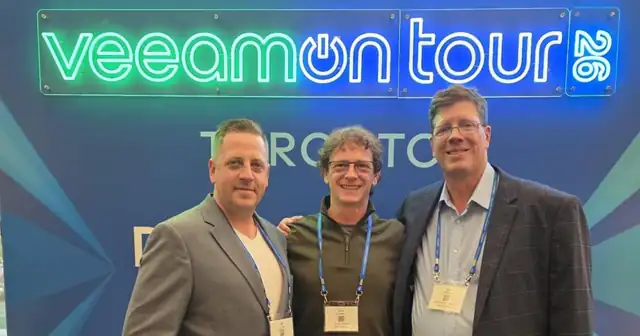
Jeff Gurney, Rod Morreau, and Ken Gebhart (left to right) in front of the Veeam ON Tour Toronto 2026 sign
The number that stuck: 109 to 1
Machine identities now outnumber humans 109 to 1 in the average enterprise, according to Palo Alto Networks’ 2026 Identity Security Landscape report, which Veeam’s keynote leaned on. Veeam’s own research says 88% of organizations are using or piloting AI agents, only 7% are truly AI-ready, and more than 82% have agents running that they don’t know about.
One caution on the trend line: the speakers compared an earlier ratio of roughly 80 to 1 with 109 to 1 to suggest rapid growth. Those were two editions of the same report series (CyberArk’s 2025 edition; CyberArk is now part of Palo Alto Networks, which published the 2026 edition), with different samples, so I wouldn’t treat that as a like-for-like trend. If anything, the real number is probably higher. Most organizations can’t say with confidence that they know every agent running in their environment (shadow AI is real), and new agents often come online long before anyone vets or inventories them.
Veeam Field CTO Derran Guinan walked through a handful of recent incidents, including stolen Salesloft Drift OAuth tokens that reached more than 700 organizations (Cloudflare and Zscaler among them) and a Serviceaide database left publicly exposed for 47 days, which put about 483,000 Catholic Health patients’ records at risk. His argument was that these come down to unmanaged non-human access. The line that stuck with me:
The agent isn’t the vulnerability. The unmanaged access is.
Derran boiled it down into four questions you can ask this week:
- How many agents are running?
- Who owns each one?
- What can each one access, and when was it last reviewed?
- Can you tell what changed, and recover to a trusted state?
His other advice is my favorite kind: treat agents like people. Give them temporary access instead of long-lived credentials, keep an actively maintained list with a named human owner for each one, and classify the data before an agent ever touches it. His closing logic was just as practical: prevention is never 100%, and an agent can do exactly what you designed and still make a bad call, so you need a way back to a trusted state.
Toxic combinations (the detective-board session)
Derran’s live demo set the stage. The graph showed 16 AI agents running in AWS Bedrock, and clicking one revealed its account, region, roles, data systems, and the sensitive data behind them.
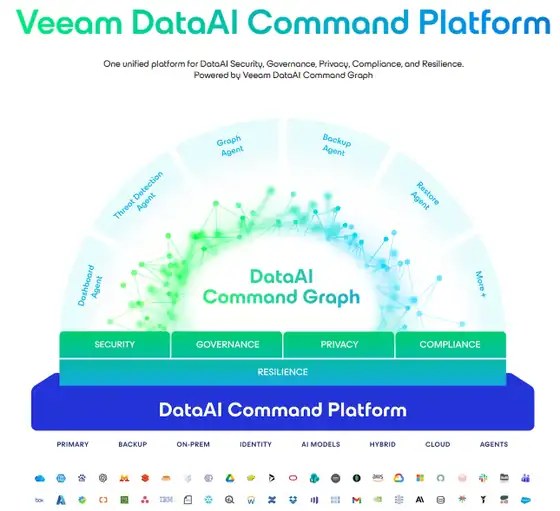
The Veeam DataAI Command Platform (Veeam)
Gareth Spanglett’s talk then used a great analogy: your security tools each hand you a finding, like personally identifiable information (PII) in a SharePoint site. That isn’t necessarily a risk. But that same site, open to everyone in the company? Now you have a “toxic combination.” He compared the knowledge graph to the evidence board in a detective show, where the red string connects the clues.
In his recorded demo (a test environment, not a customer’s), he started with a list of SharePoint sites that contain credit card data. By itself, that list tells you almost nothing. Then he added one condition: files open to everyone in the company. The list collapsed to two sites holding 18 files of sensitive data. Instead of spending the day figuring out which sites mattered, a team had two to go fix.
He ran two more. In one, he looked at external users with access to sensitive data, and the interesting part was how they got it: not through an Active Directory group or a root permission, but because someone right-clicked a folder and shared it outside the company. In the other, he looked at S3 buckets holding personal data. Eight buckets became one that was publicly accessible, fed a credit card application process, and moved data to another location in a way that could raise data-transfer regulation questions (he cited GDPR). The graph also showed who owned that process.
Gareth’s backstory made it land. When he worked on the security side, his CISO’s first question was always “where are my risks?” The tools handed over 50,000 critical or high vulnerabilities, and one board slide took five or six people three weeks to assemble. His line was that you can’t give someone 10,000 issues to fix and expect action. That’s the kind of prioritization I wish every client dashboard had.
Two things to try this week
First, ask the four agent questions. Second, pick your most overshared SharePoint site and see what sensitive data is sitting in it. If you only do one, start with the four questions.
Part 2 goes up Thursday: what shipped in Veeam Data Platform 13.1, why Microsoft 365 recovery has two speeds, and what the Canadian panels taught me. As always, Long View is a Veeam partner, so I’m not neutral, and this is conference-floor impressions, not lab results.
Until Thursday, go count your agents (and make sure a real human is named for each of them). I’d bet the number is higher than you think.
Sources: sessions I attended and slides I photographed at Veeam ON Tour Toronto. Customer figures and Veeam research are from Veeam speakers or slides. External checks: Help Net Security, Palo Alto Networks, TechTarget on Salesloft Drift, SecurityWeek on Serviceaide, Securiti on toxic combinations, Veeam.